For agencies and firms
You look after your clients. We take care of their procedures.
You register the case in the panel and we do the rest: we review the file, take care of the appointment and leave the notice ready for you to send to your client on WhatsApp. You see each case, its status and what you have paid Tramity so far, in one place.
Today: visas for Mexico, Mexican passports and SAT procedures. Private service; the appointment with the authority is free. The panel exists only in Spanish, and the screenshots on this page show it in Spanish.
What an agency looks like today
If your agency lives on WhatsApp, this sounds familiar.
Appointments that do not show up
Logging in to the portal again and again, at any time, to catch a slot that is gone in minutes. For each client.
The “how is my case going?”
Every client asks, and the answer is spread across chats, screenshots and a spreadsheet nobody updates.
Documents scattered everywhere
Passports and certificates on the phone of whoever received them, without knowing which version is the right one.
One detail typed wrong and you start over
You find out when it can no longer be fixed.
The accounts, by hand
What is scheduled, what is paid, what is still to be collected.
None of that is your business. Your business is the client.
How it works
You register. We work. You let your client know.
Step 1 · You
You register the case
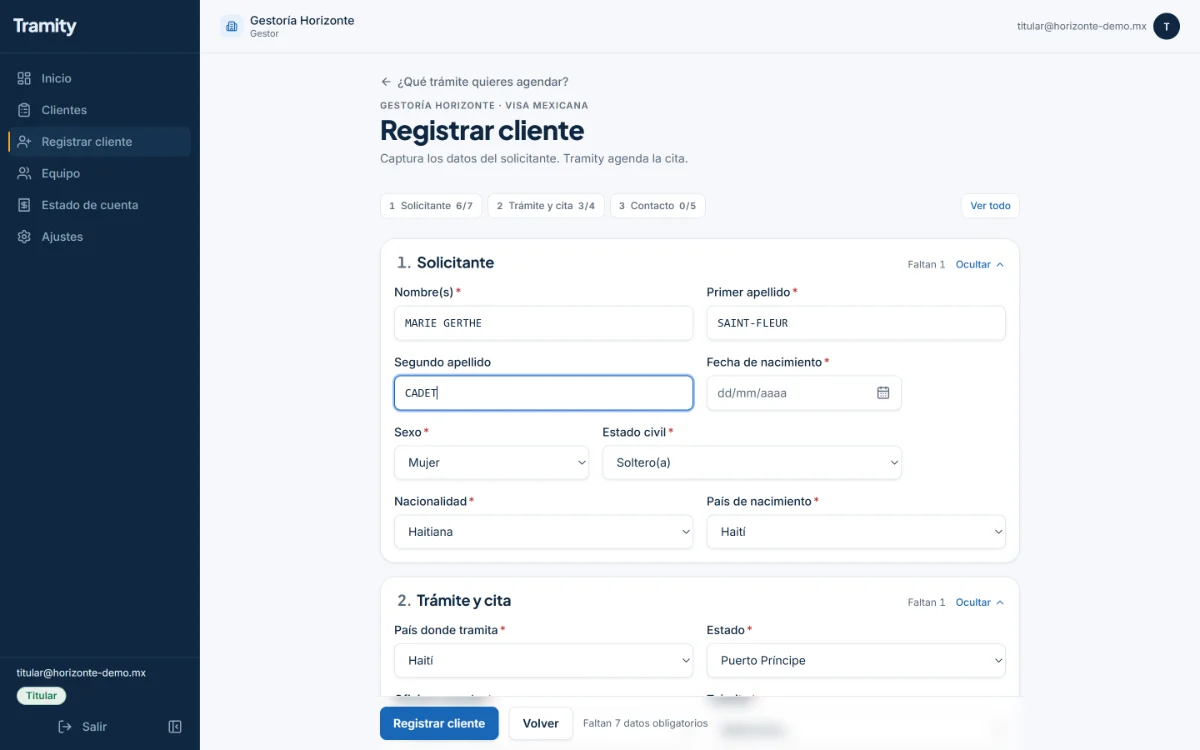
You choose the procedure and fill in a guided form, with lists of offices and services: it asks you only for what that procedure needs, and you attach the documents that procedure asks for right there.
Step 2 · Tramity
We take care of it
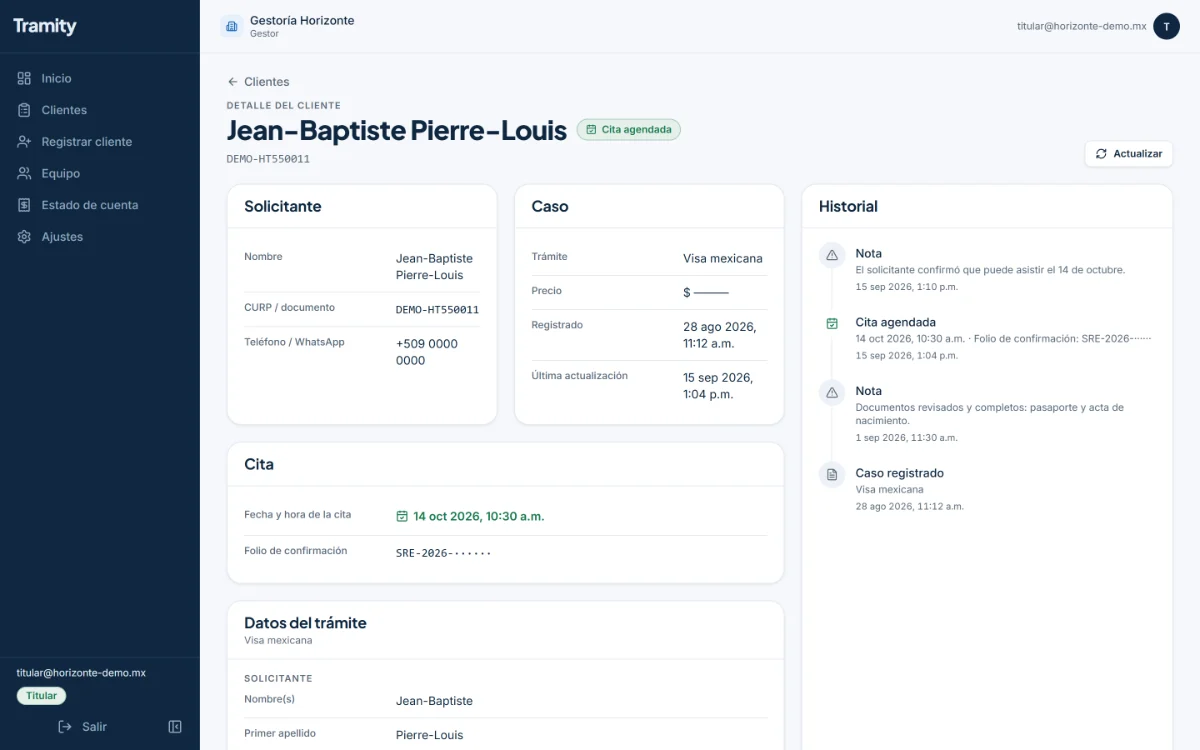
We review the file and take care of the appointment, of the type that corresponds. If a detail is missing or does not match, the case comes back to you with the reason so you can correct it.
Step 3 · You
We let you know and you let your client know
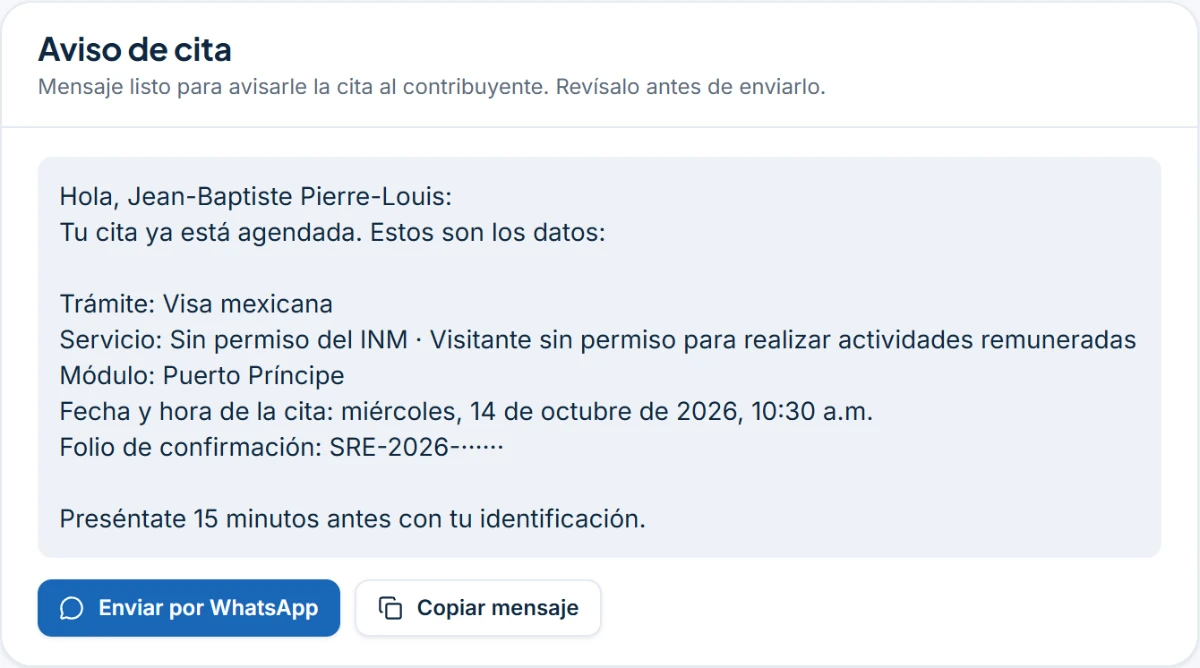
You get an email when the appointment is scheduled, and in the panel you have the message ready (procedure, office, date, time and reference number) to send on WhatsApp without writing it yourself.
We do not promise dates: availability is decided by the authority. If the authority cancels the appointment, we look for a new one at no additional cost.
The panel
Everything about your agency, in a single panel.
All the images on this page are from the panel with sample data: the names, the reference numbers and the amounts are made up.
You know what to attend to when you sign in
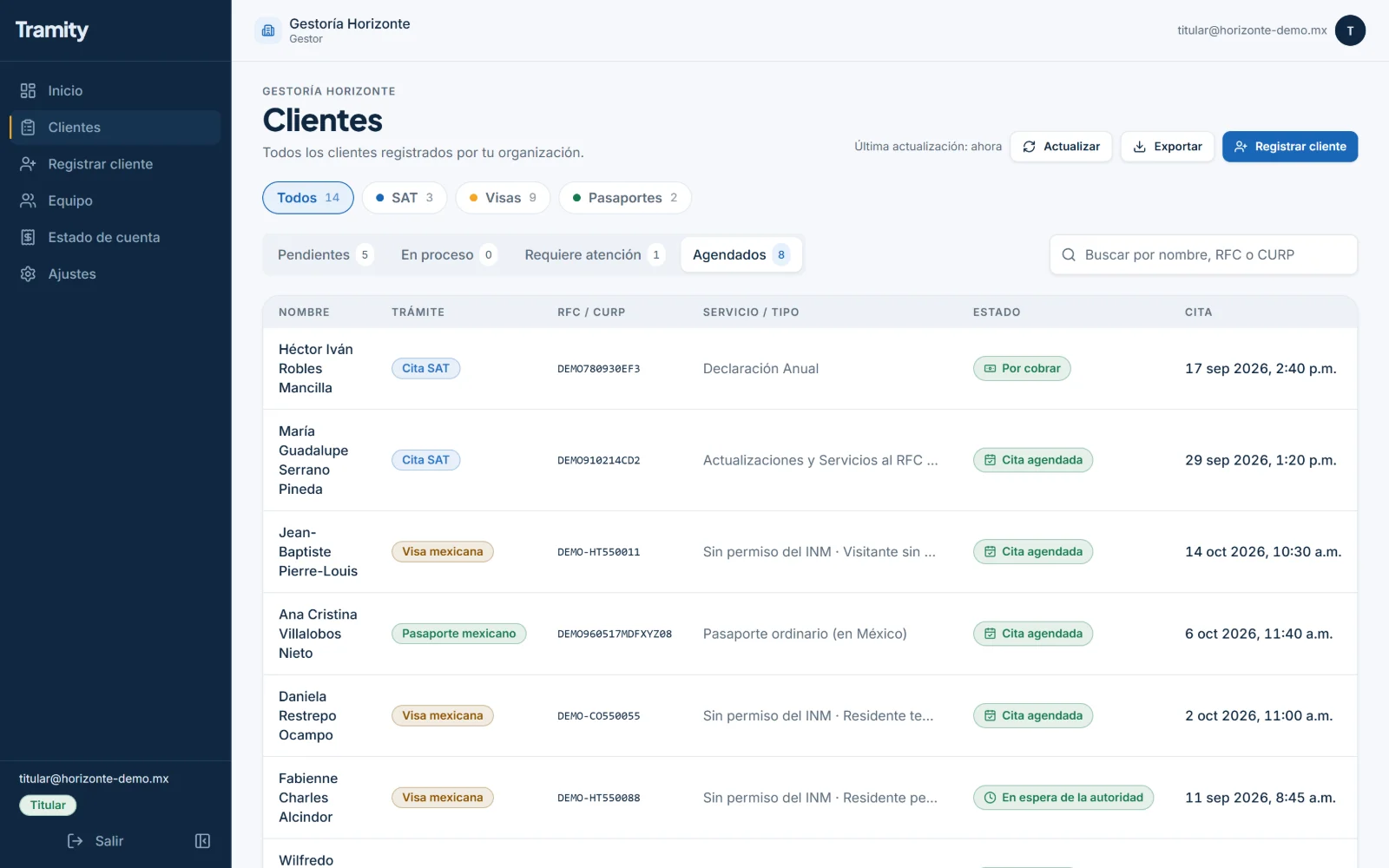
What needs your attention, the upcoming appointments, how many cases have an appointment this month and, if you are the account owner, what you still have to pay us.
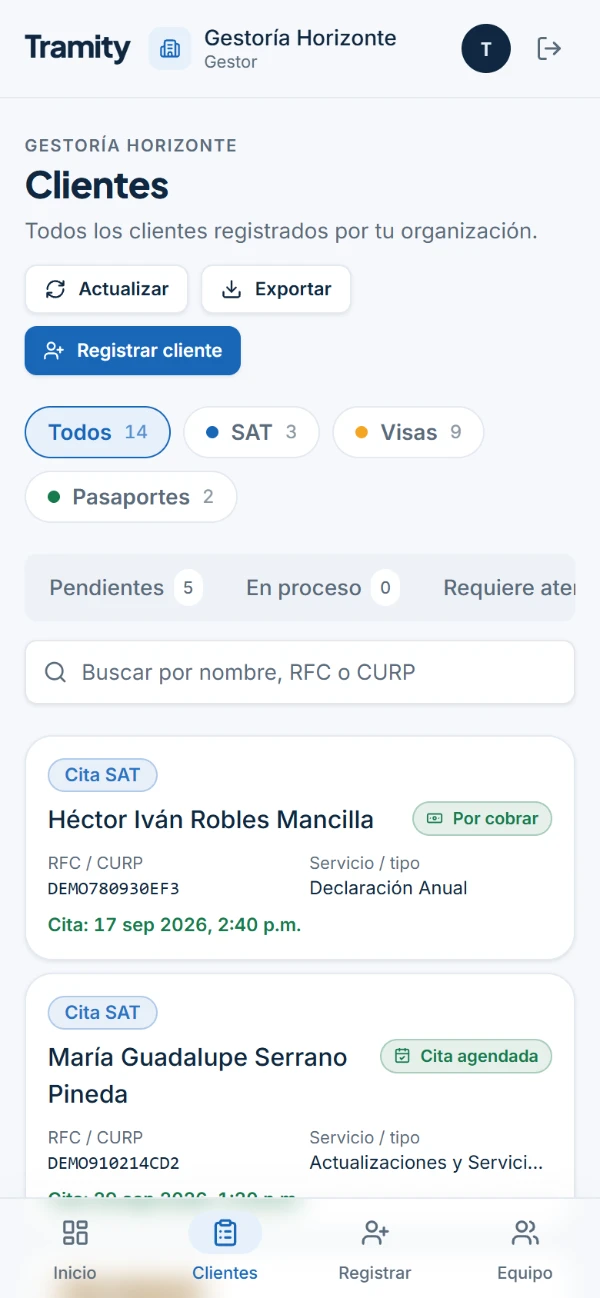
You answer “how is it going?” in seconds
Tabs for Pendientes (pending), En proceso (in progress), Requiere atención (needs attention) and Agendados (scheduled), with search by name, RFC or CURP and a filter by procedure.
Fewer mistakes from the start
One form per procedure (SAT, visa or passport) that asks only for what that procedure needs, with the lists of offices and services.
No more files on the phone
Each document stays attached to its client's case. The copies are deleted 30 days after the case is completed.
You do not lose the case over one detail
If something does not go through, the case comes back to you marked with the reason; you correct it from the panel and it continues on its way.
Your client finds out right away
The appointment notice comes already put together with the procedure, the office, the date, the time and the reference number, to copy it or open it in WhatsApp.
Everything is on record
The registration, the appointment and the incidents of the case, with their dates.
You find out without having to keep checking
The account owner receives an email when the appointment is scheduled, when a detail has to be corrected, and when an appointment falls through and has to be arranged again.
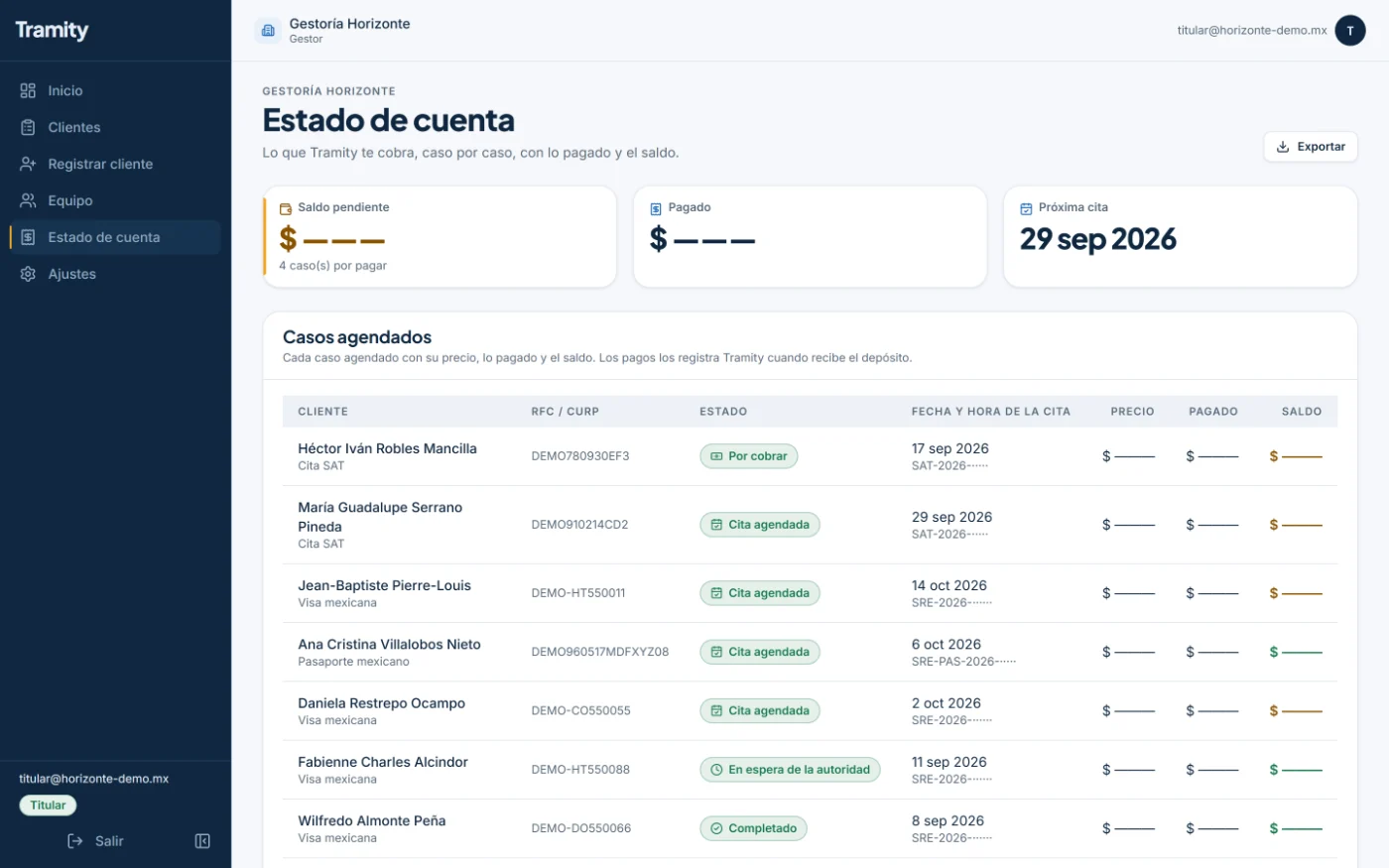
Clear accounts
The account owner sees each scheduled case with its amount, what has been paid and the balance.
Your control, your bookkeeping
You download to Excel the list you are looking at, with the filters you applied.
Each person with their own access
You add the email of each team member and they sign in with it. The money, the team and the settings are seen only by the account owner, and you remove an access when someone leaves.
To work together
Four rules that protect your clients and your agency.
The authority can cancel or change appointments. These rules protect your clients and your agency; and if the authority cancels an appointment, we arrange it again at no additional cost.
- Only real clients who asked for the procedure are registered, with their consent and their real details.
- No agency presents itself to its client as official or as part of the government.
- Appointments are not resold or transferred: each one is for the registered person.
- The government fees for the procedure are paid by the client directly to the authority.
Frequently asked questions
What agencies ask before starting.
Does my client know that I work with Tramity?
You are the one who looks after your client and lets them know. You are the one who sends them the appointment message.
How much does it cost?
Our fees vary by procedure. We give you the cost before we start.
How long does it take to get the appointment?
We cannot promise that: availability depends on the authority. In the panel you see the status of each case.
What happens if the authority cancels the appointment?
We look for a new one at no additional cost, and we let you know by email.
And if a detail is wrong?
The case comes back to you with the reason and you correct it from the panel.
Can my team members use the panel?
Yes. Each one signs in with their own email. The amounts, the team and the settings are seen only by the account owner.
What happens to my clients' documents?
They are deleted 30 days after the case is completed and, if we are asked to, we anonymize the data. We do not ask for passwords or keep originals.
Do I have to pay the government fees?
The government fees for the procedure are paid by your client directly to the authority.
Price and terms
Stop carrying all that work. Devote yourself to your clients.
Tell us which procedures you handle and how many cases a month, and we will reply with the terms.